How to Verify Your Token2 FIDO2 Key
Last updated 2026-08-13
When using a FIDO2 security key, it’s important to ensure that the key you have is a legitimate Token2 device. While every FIDO2 key has an AAGUID (Authenticator Attestation Globally Unique Identifier), which identifies the device model, this alone does not guarantee that the key is authentic or securely manufactured.
To fully verify a Token2 key, we use certificate-based attestation. Each Token2 key contains a unique attestation certificate issued by Token2’s Certificate Authority (CA). This certificate is embedded in the key and also stored in the FIDO Metadata Service (MDS), which is a public repository used by services to verify FIDO2 devices. This information can be retrieved using our FIDO2 Demo tool.
When you use our verification method:
- The key presents its attestation certificate.
- The tool checks that the certificate chain is valid, meaning that each certificate in the chain is correctly signed and trusted.
- Importantly, it also verifies that the certificate is signed by Token2’s CA, confirming that it was manufactured and issued by Token2.
If the verification result says:
“Attestation verified”
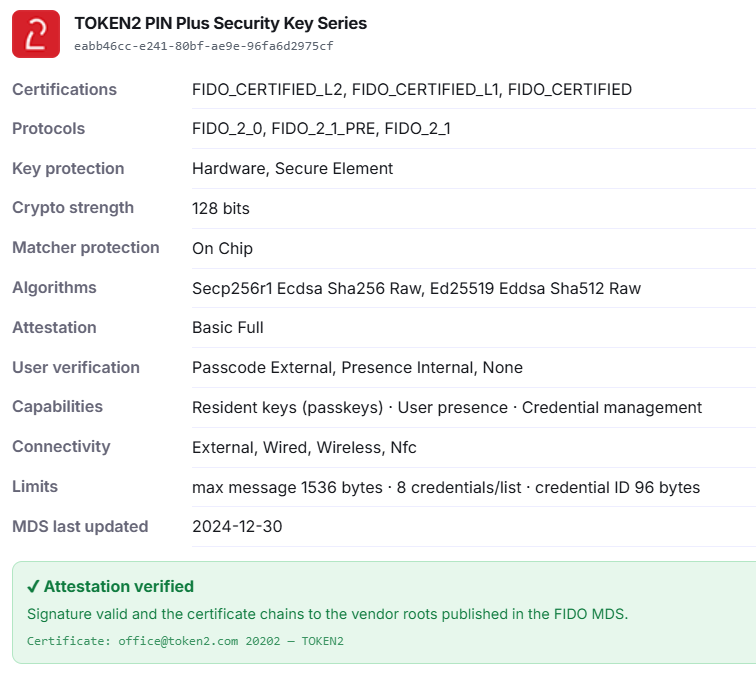
this means your key is genuine.
Why this matters:
- It prevents counterfeit or tampered devices from being used.
- Services can trust that the key meets Token2’s security standards.
- Combined with the AAGUID, the certificate ensures both the device model and its authenticity.
Note about Pico-based keys:
Pico-based Token2 keys will not pass this certificate verification.
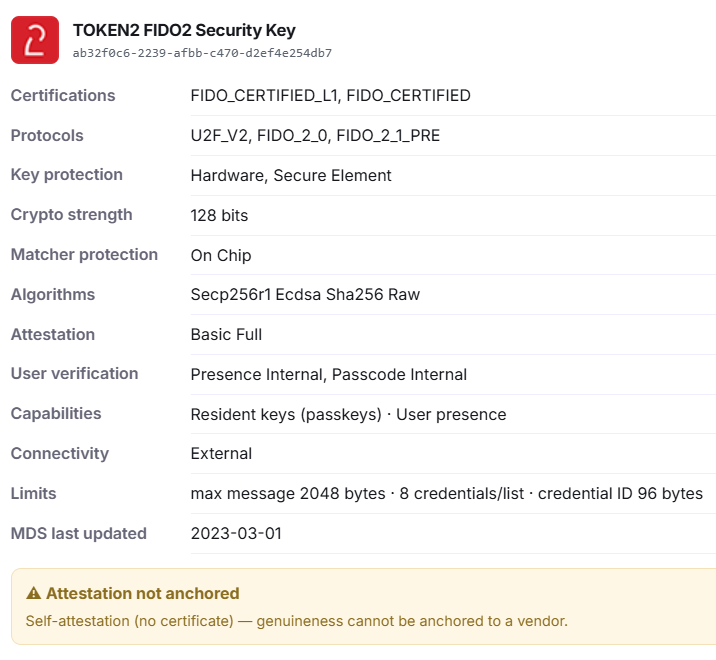
This is normal because Pico keys use hardware that is not FIDO certified. As a result, they do not contain a Token2 attestation certificate, but they are still fully functional for FIDO2 authentication for systems not enforcing key attestations.