Looking to use your FIDO2 USB-A key with your iPhone or iPad ? You'll need our FIDO2 USB-A to Lightning adapter to make it happen! This adapter is specifically designed to connect your FIDO2 USB-A key to your iPhone or iPad's Lightning port, enabling secure and convenient authentication for your iOS device. With its durable construction and easy-to-use design, our adapter ensures a seamless experience every time you need to authenticate with your FIDO2 key.
However, it's important to note that our FIDO2 USB-A to Lightning adapter is designed to support
FIDO protocols only, and not OTP. If you need to use OTP functionality with your key, you will need to use NFC instead. Additionally, if you are using your FIDO2 key's HOTP functionality, please be aware that it uses keyboard emulation, which may interfere with the process of entering your PIN code on iOS devices. As the device recognizes the security key as a keyboard, it may disable the on-screen keyboard, making it impossible to enter your PIN code. To avoid this issue, we recommend that you either disable the OTP functionality of your security key using our Windows companion app, or unplug the key when entering your PIN code.
Additionally, there is another aspect that appears to be more of an iOS GUI glitch. When an iPhone prompts the user to choose the passkey type, users should start using the FIDO2 key without following the on-screen instructions.
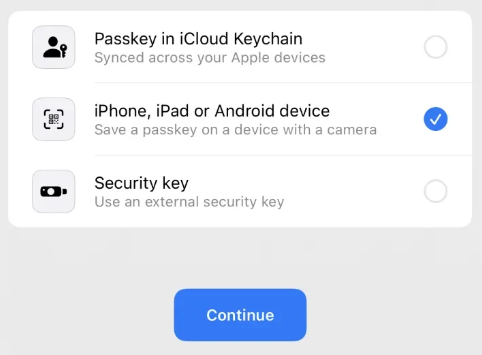
Specifically, when selecting the "Security Key / External Security Key" option, iPhones only search for NFC keys and disregard the USB-connected ones.
We understand that security is a top priority for our customers, and we want to ensure that you have all the information you need to make an informed purchase. If you have any questions or concerns about our adapter or your FIDO2 key, please don't hesitate to contact us.