TOTPRadius - Purchasing and adding user licenses
Last updated 2026-07-18
How to purchase and generate the license key
The licenses can be purchased online on our web shop. You can choose the number of licenses required and add to the basket. After completing the purchase you will receive an email containing the order page URL. To generate the TOTPRadius user licenses, click on the "generate CAL" button on the order page and provide the Host ID. The license key will be generated and sent to your email address:

The Host ID can be obtained from the Web Admin panel of your TOTPRadius. Navigate to General Settings, then choose License:
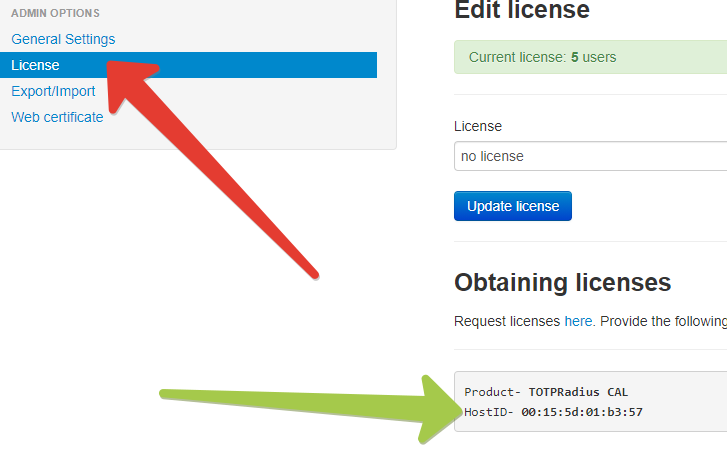
The string next to HostID should be used for generating the client licenses.
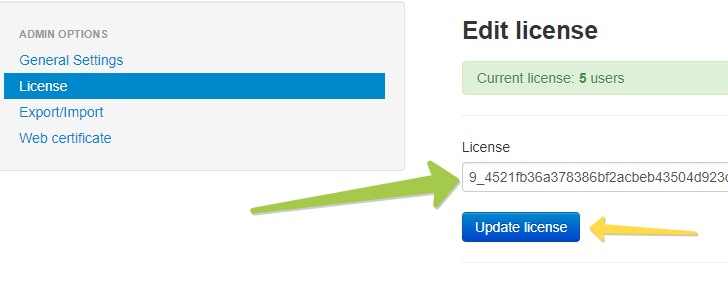
Upon obtaining the license string (which should be in the following format: NNN_[license-hash] , where NNN is the number of licenses purchased allowing to identify the total allowed users without installing the license) you need to add it to the appliance. This is done on the same page (General Settings -> Licenses) as shown below:
- Information to identify your order (ideally your Order ID or Invoice ID, or email address if IDs are not available)
- Previous License Keys and Host IDs
- New License Keys and Host IDs