FIDO2 Token Management Tool - fido2-manage
Last updated 2026-10-06
Overview
fido2-manage is an open-source, cross-platform tool for managing FIDO2 security keys over USB and NFC — passkeys (resident keys), PINs, PIN policy, fingerprints and factory reset. This is the ground-up rewrite of the earlier fido2-manage: a single native application for Windows, macOS and Linux, with no Python/pexpect dependency and the familiar command-line syntax preserved.
The project ships in two forms, in the same package:
- fido2-manage — the command-line tool (the main deliverable). Drop-in compatible with the classic
fido2-manage.exeflag set. - Token2 Key Manager — a graphical front-end for fido2-manage, which additionally adds PIV certificate management and OTP / OATH-TOTP/HOTP account management. (This is why it is no longer named "FIDO2 Manager".)
The package also bundles token2-piv-tool for PIV smart-card management on the command line.
New unified tool
This page covers the new cross-platform version. The previous C++ (Windows) and Python/tkinter (Linux) tools are superseded by it; their source is preserved on thelegacy branch.
Supported devices
Works with FIDO2.1 (PRE or FINAL) keys from any brand, as well as PIV and OATH-capable devices. With FIDO2.0 keys, passkey management is not possible, so only basic information is shown. Token2 PIN+ and FIDO2 keys are fully supported, including their OTP and PIV applets.
Key features
- FIDO2: device info and storage statistics, passkey (resident key) listing and deletion, PIN set/change, minimum-PIN-length policy, enforce user-verification (always-UV), fingerprint enrollment/listing/rename/delete on biometric keys, and factory reset.
- PIV (GUI and
token2-piv-tool): generate keys, import/export certificates, PIN/PUK and management-key operations, with a PKCS#11 module. - OTP / OATH (GUI): Token2 OTP applet and OATH-TOTP/HOTP account management, including the HID-keyboard (Button-HOTP) and USB-interface settings on Token2 PIN+ keys.
- Cross-platform & self-contained: native Windows, macOS and Linux builds; no Python runtime required.
Download
The project is fully open-source and available on Github:
Windows
Download the portable folder. It contains the GUI (token2-key-manager.exe), fido2-manage.exe, the other command-line tools and all required DLLs together. No installation needed — unzip and run.
macOS
Download the signed and notarized .dmg, drag the app to Applications, and launch it.
Linux
Three options are provided:
.debpackage (recommended) — installs the GUI and CLI tools, and automatically pulls in and enables the required smart-card service. No extra steps:sudo apt install ./token2-key-manager_*_amd64.deb- AppImage — a single portable file. On Ubuntu 24.04 and newer it requires
libfuse2(sudo apt install libfuse2), or run it with./Token2-Key-Manager-x86_64.AppImage --appimage-extract-and-run. The bundled command-line tools are reachable via--tool, e.g../Token2-Key-Manager-x86_64.AppImage --tool fido2-manage -list. - Portable folder — the binaries and libraries, for manual placement.
For the AppImage and portable builds, FIDO2 and PIV need the PC/SC smart-card service installed and running:
sudo apt install pcscd libpcsclite1 libccid
sudo systemctl enable --now pcscd
(The .deb does this for you. OTP works over USB-HID without PC/SC.)
Command-line usage (fido2-manage)
Open a terminal in the folder containing the tool and run fido2-manage with the parameters below. The syntax matches the classic Windows fido2-manage.exe.
Parameters
-list: List available devices. With a single key plugged in, the device number is always 1.-info -device [number]: Device information.-storage -device [number]: Resident-credential storage statistics (used / free).-residentKeys -device [number]: List the relying parties (domains) on the device.-residentKeys -device [number] -domain [domain]: List resident keys for a specific domain.-delete -device [number] -credential [credential]: Delete a credential by its ID.-uvs -device [number]: Enforce user verification (always-UV) on.-uvd -device [number]: Disable enforcing user verification.-setPIN -device [number]: Set a PIN (new or freshly reset keys).-changePIN -device [number]: Change the PIN.-reset -device [number]: Factory-reset the FIDO applet. Must be run within ~10 seconds of plugging the key in — replug, run the command, and touch the key when it blinks. This resets only the FIDO applet; it does not affect the OTP or PIV applets on the same key.-forcePINchange -device [number]: Require a PIN change at next use.-setMinimumPIN [minimum] -device [number]: Set the minimum PIN length. Can only be increased, not decreased; a factory reset reverts it (default 4 for regular keys, 6 for PIN+ series, 8 for PIN+ Octo).
Biometric key options
-fingerprint -device [number]: Enroll a fingerprint (4 samples of the same finger). Add-fingerprintname [name]to label it.-fingerprintlist -device [number]: List enrolled fingerprints.-deletefingerprint [ID] -device [number]: Delete an enrolled fingerprint by its list ID.-renamefingerprint [ID] -fingerprintname [name] -device [number]: Rename a fingerprint slot.
If -pin [PIN] is omitted on a command that needs it, the tool prompts for the PIN (input is masked). If a PIN does not meet the length or complexity requirements, FIDO_ERR_PIN_POLICY_VIOLATION is returned.
Examples
- List devices:
fido2-manage -list - Device info:
fido2-manage -info -device 1 - Storage statistics:
fido2-manage -storage -device 1 - All relying parties:
fido2-manage -residentKeys -device 1 - Resident keys for a domain:
fido2-manage -residentKeys -device 1 -domain login.microsoft.com - Delete a credential:
fido2-manage -delete -device 1 -credential Y+Dh/tSy/Q2IdZt6PW/G1A== - Set a PIN (new/after reset):
fido2-manage -setPIN -device 1 - Change a PIN:
fido2-manage -changePIN -device 1 - Enforce user verification:
fido2-manage -uvs -device 1 - Rename fingerprint in slot #1:
fido2-manage -renamefingerprint 1 -fingerprintname Index_Finger -device 1
Administrator rights on Windows
Whether you need an elevated terminal depends on how the key is accessed, not on the operation:
- No admin needed — Token2 keys over USB present a smart-card (CCID / PC-SC) interface, which a normal user process can use. Listing, info, PIN, passkeys, fingerprints and reset all work without elevation.
- Admin needed — raw-HID FIDO keys (e.g. a YubiKey over USB) and NFC-connected devices are opened directly, and Windows restricts raw FIDO AID accessto elevated processes. Run the app/cli as Administrator for those.
macOS and Linux do not require elevation for either path.
Graphical application (Token2 Key Manager)
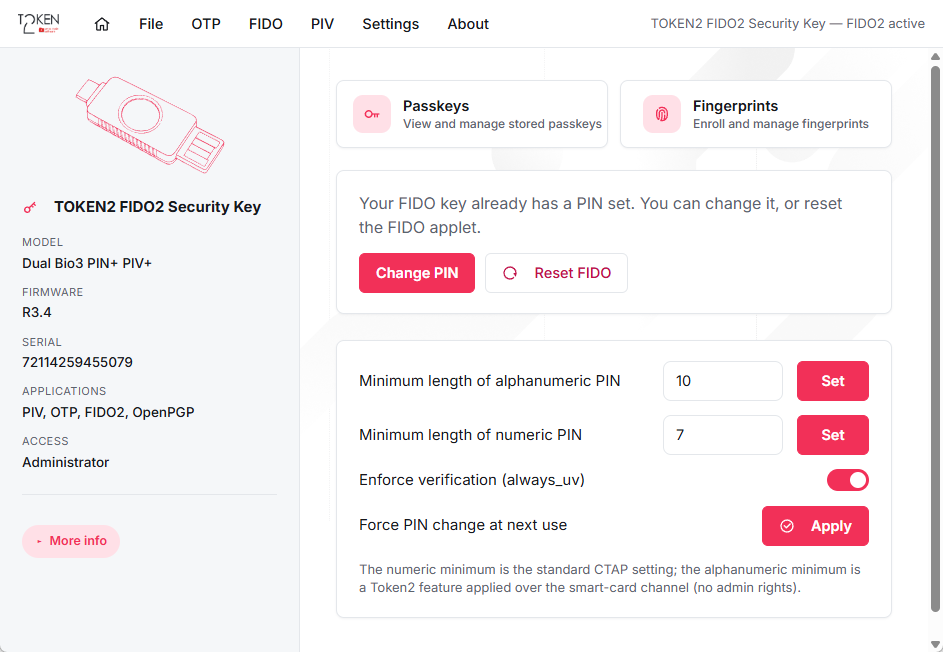
The GUI is a native desktop application for Windows, macOS and Linux. It detects the connected key, shows its applets, and provides the FIDO2, PIV and OTP management screens.
FIDO2
- Select a key; a valid PIN is required to view and manage passkeys and fingerprints. If no PIN is set, "Set PIN" is the only enabled action.
- Device info: model, AAGUID, firmware version, algorithms, transports, and passkey storage (used / free).
- Passkeys: list resident credentials (with the relying party / username) and delete them.
- PIN: set or change the PIN, set the minimum PIN length, enforce user verification (always-UV), and force a PIN change at next use.
- Fingerprints (biometric keys): list, enroll, rename and delete fingerprints. Token2 keys support up to 29 fingerprints.
- Reset: factory-reset the FIDO applet (within ~10 seconds of plugging the key in).
PIV
- Smart-card certificate and key management: generate keys, import/export certificates, and PIN/PUK and management-key operations.
OTP / OATH
- Token2 OTP applet and OATH-TOTP/HOTP account management, plus the HID-keyboard (Button-HOTP) and USB-interface settings on Token2 PIN+ keys.
On Windows, because FIDO applets of Token2 keys are accessed over the smart-card interface, the GUI does not require administrator rights for those keys. Raw-HID-only keys still need to be run elevated.
Good to know
- Any brand: the tool works with FIDO2.1 keys from any manufacturer, not only Token2.
- FIDO2.0 keys: only basic information is shown; passkey management requires FIDO2.1.
- Platform authenticators / Windows Hello may appear in the device list but cannot be managed by this tool — use the platform's own settings for those.
- Masked PIN entry: the command-line tool masks PIN input. Deleting a credential is irreversible and asks for confirmation.
- No Python required: unlike the previous Linux tool, this version is a native binary with no Python/pexpect/tkinter dependency.
FAQ
Q: Is this for Token2 devices only?
A: No. As a member of the FIDO Alliance, we aim to make the tool usable with any standards-compliant device. It works with FIDO2.1 security keys from any brand.
Q: What happened to the old Windows (C++) and Linux (Python) tools?
A: They have been replaced by this single cross-platform version, which removes the Python dependency and adds PIV and OTP management. The old source remains on the legacy branch.
Q: Do I need administrator rights?
A: On Windows, not for latest Token2 keys over USB (smart-card interface). Raw-HID-only keys need an elevated terminal. macOS and Linux need no elevation.